






















Key Takeaways
- Prioritize safety first when comparing a top rated kids language app: ad-free design, kidSAFE listing, and no voice uploads matter more than flashy features for preschool and early elementary kids.
- Look for audio-led learning that works before reading does. A strong kids language app should let a child hear, tap, speak, and repeat without needing an adult to read every instruction.
- Check speaking practice closely. The best language app for kids doesn’t just build vocabulary; it gives shy learners real pronunciation feedback so they’ll actually say the words out loud.
- Favor short, repeatable sessions with clear progress reports. Parents get more value from a mobile language app that shows what stuck after 5 to 10 minutes a day than from one that asks for long, forced sessions.
- Match the app to family life, not just the store rating. If siblings share one device, multiple profiles, worksheets, songs, and offline-friendly resources can turn a download into a routine that lasts.
- Compare free trials and limited-access versions before paying. A top rated kids language app should feel safe enough, fun enough, and simple enough that families want to keep using it after the first week.
Parents don’t keep a language app on a child’s device for long if it feels noisy, pushy, or weird. That’s the blunt test, and it’s why the search for a top rated kids language app has changed so much. Star counts still matter. Downloads still matter. But a preschooler who taps for two minutes and walks away tells a different story than a child who comes back tomorrow, then again after lunch, then again while a sibling is waiting for a turn.
For families raising kids in more than one language, the real question is simpler: does the app feel safe enough to leave running without hovering over every tap? If the answer is no, it doesn’t matter how polished the logo looks or how many badges the store page flashes. A good app has to do three jobs at once. It has to keep little kids engaged without reading. It has to protect their privacy. And it has to make language feel like play, not a worksheet in disguise.
That’s especially true for ages 2 to 8, where attention spans are short and independence matters. Kids that age don’t want a lecture. They want a voice, a picture, a sound, then a quick win. Short loops. Repetition without boredom. Real speech practice where they can say a word out loud and hear something back. The honest answer is that most apps don’t get all three right.
So parents end up doing what parents always do. They compare the tiny details. Is it ad-free? Does it ask for a parent to read every instruction? Does it store voice data, or keep speaking local on the device? Those aren’t side notes. They’re the whole game.
Simple idea. Harder to get right than it sounds.
Why parents are rethinking kids’ language apps right now
Write this section as if explaining to a smart friend over coffee — casual but accurate and specific. Parents aren’t just asking what a language app does anymore; they’re asking whether it earns a spot on the home screen. A top rated kids language app has to do more than flash bright colors and hand out badges. It needs to feel safe, stay useful after day three, and work for a child who can’t read a full sentence yet.
And that’s where the screen-time test starts. If an app feels like a void of tapping with no real learning loop, it gets deleted. If it helps a child hear, repeat, and remember a word without adult help, it stays. The difference between a fun distraction and real language development is easy to spot in a week.
The screen-time test: does the app earn its place?
A top rated language games app for children should keep a child moving without confusion. Audio cues matter. So does a clean profiler setup for siblings, a mobile download that works fast, and a simple stack of activities that doesn’t overflow a preschooler’s attention.
Parents also look for a top rated language app with speaking practice, because that’s where confidence starts. A top rated language app with progress tracking helps adults see whether the child is actually picking up words, not just pressing buttons.
Here’s what that actually means in practice.
Why audio-led learning matters for kids who aren’t reading yet
For early readers, audio-led learning beats text-heavy menus every time. A child can hear hello, copy it, and move on — no decoding required. That’s the point. It’s also why bilingual homes keep coming back to tools that feel like play, not schoolwork.
What “top rated” should mean beyond star counts and downloads
Star counts are nice. They’re not enough. A top rated language app with multiple profiles, a clear visual flow, and steady speaking prompts does more for a family than a pile of reviews ever will. The best sign? A child asks to open it again tomorrow.
For families comparing a top rated kids language app, the real question isn’t “How popular is it?” It’s “Will my child use it on their own?”
- Look for: audio-first lessons
- Check for: safe, ad-free design
- Expect: progress you can actually see
Speaking practice is the difference parents notice fastest
Short answer: kids don’t need another tap-heavy app.
They need a top rated kids language app that gets them saying the word out loud, then hears whether they’re close. That shift changes the whole experience. Quiet guesswork turns into actual language.
In a top rated language app with speaking practice, the child hears a model, repeats it, and gets instant visual feedback. No reading required. No long setup. For a preschooler, that’s the difference between a function that looks nice and one that actually works in a busy home.
The features that make daily use easier for busy families
What makes a top rated kids language app feel safe enough for families? It’s not flashy extras. It’s whether a child can open it, hear a clear prompt, and keep going without a parent hovering over their shoulder. That’s the real test.
For households with preschoolers and early readers, the best setups are the ones that cut friction fast. A top rated language games app for children should feel simple on a tablet or phone, with short activities, visual cues, and no reading required. If a child has to ask “what does this say?” every 30 seconds, the app loses its edge.
Multiple learner profiles for siblings sharing one device
Shared devices get messy. One child jumps ahead, another lands in the wrong profile, and progress turns into a stack of tiny problems. A top rated language app with multiple profiles keeps that from happening.
That matters in real homes, especially where one child is hearing Spanish at breakfast and another is learning French after dinner. With separate profiles, each child can keep their own language, download path, and play history. No reset drama. No confusion.
Progress reports that help parents see what’s sticking
Parents don’t need a profiler dashboard that looks like startup software. They need a top rated language app with progress tracking that shows what the child has actually learned: words recognized, sounds practiced, and lessons finished.
It’s a small distinction with a big impact.
Studycat’s weekly reports fit that need well, — a top rated language app with speaking practice adds one more useful layer. VoicePlay-style feedback gives kids a chance to say hello, match sounds, and hear the difference between what they meant and what came out (that little gap matters).
Worksheets, songs, and printables for mixed screen and offline routines
Then there’s the home rhythm. Songs for the car. Printables at the kitchen table. A worksheet after lunch. That mix keeps language learning from feeling like a mobile app only, and it helps parents who want a little offline follow-through without building a whole lesson stack from scratch.
- Best for short daily use: 10-minute sessions
- Best for siblings: separate profiles
- Best for parent peace of mind: simple reports and ad-free design
That’s what busy families actually stick with. Not noise. Not fluff. Just a top rated kids language app that behaves like it gets real life.
How families can judge age fit before they download
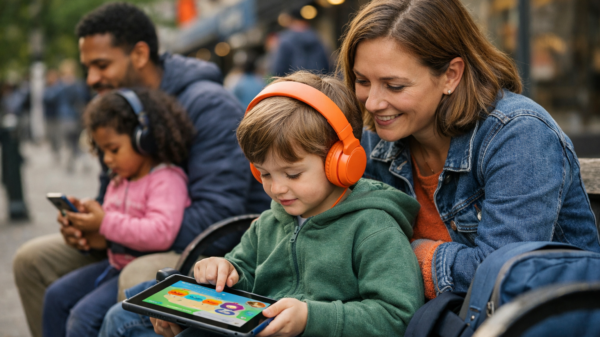
A parent opens the app store, taps a preview, and the first thing the child does is point at the icons. That moment tells more than a polished sales page does. A top rated kids language app has to work before a child can read a single instruction.
For preschoolers, audio has to do the heavy lifting. The best top rated kids language app feels like a top rated language games app for children because the child can hear, tap, repeat, and keep going without adult rescue. Short rounds, clear voices, and visual cues beat long explanations every time.
What works for preschoolers who need more audio than reading
Look for a simple stack of actions: listen, tap, say it back. If the app depends on reading, the child gets stuck fast. A good fit for this age often includes download-friendly lessons, bold icons, and no clutter—nothing that feels like a coding screen or a profiler page. Just language, play, and movement.
What early elementary kids need to stay engaged without help
Children who are 5 to 8 usually want more challenge. They stick longer when the app has a top rated language app with speaking practice and a top rated language app with progress tracking, because they can hear their own voice, see what changed, and keep their own pace. A top rated kids language app should also offer top rated language app with multiple profiles so one child’s progress doesn’t overflow into another’s.
Why age range alone doesn’t tell the whole story
An age label is only a pointer. Parents should check whether the app works on mobile, whether the voice prompts make sense, and whether the path feels like a tiny home edition instead of a startup demo. That difference matters. A lot.
Most people skip this part. They shouldn’t.
In practice, the safest choice is the one that matches attention span, not just birthday.
What the most trusted kids language apps tend to have in common
A surprising pattern shows up fast: the apps parents trust most aren’t the loudest or the flashiest. They’re the ones that act less like a cluttered startup stack and more like a steady home routine—short lessons, clear audio, and a simple download path that doesn’t need adult decoding every five minutes.
Clear learning paths instead of open-ended wandering
A top rated kids language app gives kids one next step, then another. That matters for preschoolers who can’t read instructions yet. A strong language app should feel like a guided visual studio demo, not a blank coding page full of pointer confusion or weird overflow errors.
Consistent audio cues that let kids work independently
For younger learners, audio is the function that carries everything. A top rated language app with speaking practice should say the word, wait for the child, then respond right away. That’s where VoicePlay-style feedback matters, because kids hear the difference between hello and the target sound without needing a parent to translate every screen.
Device compatibility for iOS and Android households
Mixed-device homes need fewer surprises. A top rated language app with multiple profiles keeps siblings separate, while mobile sync means the same subscription works whether the tablet is Android or iOS (no extra download drama).
- Check for ad-free play
- Look for on-device voice features
- Expect progress reports, not just badges
That’s the safety test. Simple, and hard to fake.
For more great reading, visit our site and explore related topics.